

Pages
Multilingual Spaces & Translation
A Space can maintain its content in multiple languages: a single page structure, but with titles, content, and publication status managed per language. This allows you to maintain, for example, both German and English versions of the same documentation without duplicating the Space.
Define content languages
In the Space settings underLanguages (see Space Settings & Branding)
Content languages – the languages in which the Space is allowed to feature content. The options are German, English, French, Spanish, Italian, Portuguese, Dutch, and Polish.
Primary language – the source language. It is the standard for the customer view and the basis for AI translation, and cannot be deselected.
Deselecting a language later does not delete existing translations - it only hides them.
Switch the language in the editor
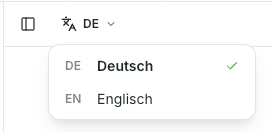
As soon as a Space has more than one content language, a language switcher with the abbreviation of the active language (e.g., DE) appears on the left in the editor toolbar. It switches both the page tree and the editor together. Each language has its own title, content, and status—you always edit the currently active language.
Translated by AI
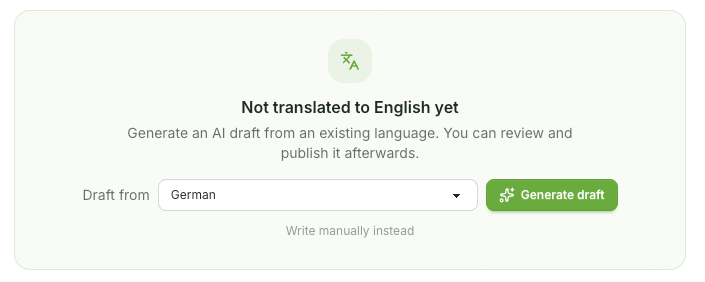
If you switch to a language where a page does not yet exist, Aveela offers a translation draft: select the source under "Draft," then generate the draft. Aveela translates the existing version and saves the result as a draft—never auto-publishing. You review, edit, and publish it yourself.
Use the Translate option in the editor toolbar to reopen the draft at any time—even to replace an existing version with a fresh translation.
Instead of manually writing "Stattdessen," start with a blank page.
The AI assistant (see AI writing assistant) works in the active Content language – there is no separate output language.
Publishe per language
Each language version has its own status: you can publish the German page while keeping the English one as a draft. The translation status table in the Languages tab shows which page is published, in draft, or not yet translated in each language.
What your customers see
A language switcher appears in the portal as soon as a page is published in more than one language. Pages that have not yet been translated or published remain hidden in the respective language - no one ends up on an empty version. Each language version has its own non-guessable address.
The portal's surface language (interface elements) is set independently under the General tab.