

Pages
Space Settings & Branding
You can access a Space's settings via the Settings tab (or the ⋯ menu on the Space card). They are divided into six sections.
Generally
Name and description of the Space.
Viewer interface language – automatic, German, or English; controls the interface elements in the portal.
Languages
Sets the Content languages of a space, which Primary language to use and shows the Translation status per page. This allows you to maintain documentation in multiple languages. See the section for details. Multilingual Spaces & Translation
(Chapter Create content)
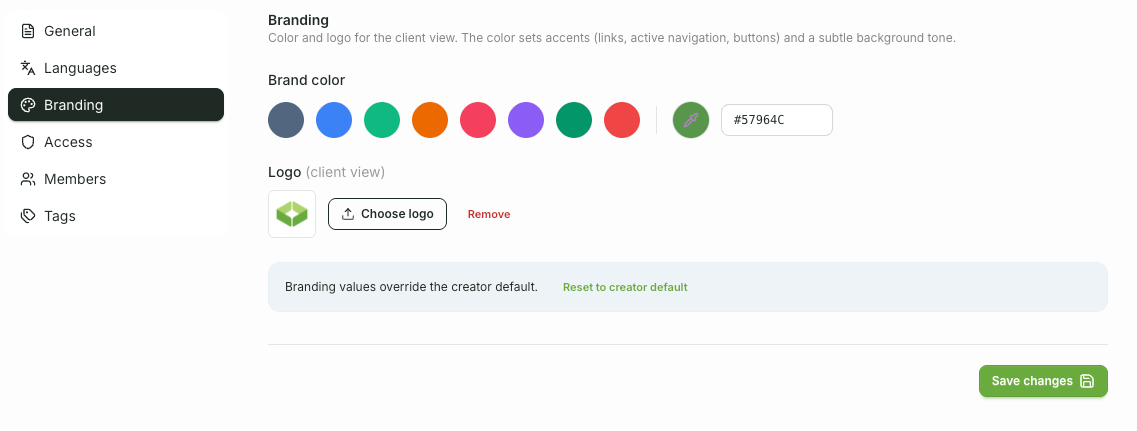
Branding
Brand color – predefined selection or custom color value.
Logo – a dedicated logo for this Space.
By default, a Space inherits the agency branding; resetting it will revert to the global default. (You can configure the agency branding itself under Account → Settings.)
Access
Sets who gets to see the Space (Access mode) – for example, only after login or via shareable link. See the chapter for details. Publish & Share.
Members
Manages Editor and Viewers of the space, including email invitation. Details in the chapter Team & Members.
Tags
Manage the media library tags for this Space: rename (with usage count) or delete. Tags apply per Space.
Changes to General, Branding, and Access are applied when you save your changes. Changes in the Members section take effect immediately.